
WooCommerce variations not reducing stock is a common issue where variable products fail to update inventory after an order is placed. This can lead to overselling, incorrect stock levels, and order fulfillment problems.
In most cases, the issue is caused by incorrect variation settings, disabled stock management, or improper order status handling. In this guide, you will learn why WooCommerce variation stock is not updating, how to fix it step by step, and how to prevent it from happening again.

What Does “Variations Not Reducing Stock” Mean in WooCommerce?
When WooCommerce variations do not reduce stock, it means that individual variation quantities are not updated after a purchase is completed. Even when an order is successfully placed or marked as completed, the stock level for that specific variation remains unchanged.
This is a common WooCommerce variation stock not updating issue that usually happens when stock management is not properly configured at the variation level. In many cases, WooCommerce either tracks stock at the parent product level or fails to trigger stock reduction during the correct order stage.
As a result, stores may continue selling products that are already out of stock, leading to overselling, incorrect inventory reports, and fulfillment problems.
Common Signs of WooCommerce Variable Product Stock Issues
- Variation stock remains the same even after orders are completed
- Products continue selling even when variation stock is already depleted
- Stock is controlled only at the parent product level instead of variations
- Inventory reports do not match actual sales data
- WooCommerce variation stock not updating across frontend and backend
Quick Fix for WooCommerce Variations Not Reducing Stock
If your WooCommerce variations are not reducing stock, you can quickly fix the issue by correcting variation-level settings, order flow, and inventory tracking behavior. In most cases, this problem is caused by a simple configuration error rather than a system limitation.
Follow these quick fixes to resolve the WooCommerce variations not reducing stock issue and restore accurate inventory updates:
Quick Fix Checklist
- Enable “Manage stock” for each variation instead of only at the parent level
- Set accurate stock quantity for every variation
- Ensure stock is reduced at the correct order status (processing or completed)
- Disable or test conflicting plugins that may override stock updates
- Clear cache to prevent outdated stock values on the frontend
- Avoid managing stock only at the parent product level
- Re-save products and variations to refresh WooCommerce stock logic
Common Causes and Fixes for WooCommerce Variations Not Reducing Stock
WooCommerce variations not reducing stock usually comes down to a few common setup, workflow, or system issues. In most cases, once you identify the cause, the fix is straightforward and can be applied quickly.
Use the table below to match the issue with the correct fix:
| Cause | Fix |
| Variation Stock Management Disabled | Enable stock management and add quantity for each variation. |
| Stock Managed at Parent Level Only | Track stock at the variation level instead of relying on the parent product. |
| Broad “Any” Attributes Selected | Avoid using “Any” options for tracked variations; define exact variation combinations instead. |
| Variation Not Identified Before Checkout | Validate variation selection early in the add-to-cart and checkout flow. |
| Missing Variation Price | Ensure each purchasable variation has a valid price set so WooCommerce can process it correctly. |
| Stock Restored Incorrectly After Order Changes | Review cancellation, refund, and failed payment rules. |
| Cache Serving Outdated Variation Stock | Exclude variation stock data and AJAX requests from cache. |
| Plugin or Custom Code Conflicts | Disable conflicting plugins or review custom code affecting stock logic. |
Why WooCommerce Variations Are Not Reducing Stock?
WooCommerce variations not reducing stock usually happens when variation-level inventory tracking is not configured correctly or when the stock update process breaks during the order workflow. This WooCommerce variable product stock issue is often caused by misaligned settings, incorrect stock control logic, or system conflicts.
To fix the problem effectively, it is important to understand the exact cause behind why WooCommerce variation stock is not updating properly.
Variation Stock Management Disabled
If “Manage stock” is turned off at the variation level, WooCommerce will not track or reduce stock after a purchase. This is one of the most common reasons behind WooCommerce variations not reducing stock.
Stock Managed at Parent Level
When stock is controlled at the parent product level instead of individual variations, WooCommerce cannot correctly update variation-specific quantities. This leads to inaccurate inventory tracking.
Missing Stock Quantity per Variation
If no stock quantity is assigned to individual variations, WooCommerce has no value to reduce. As a result, variation stock remains unchanged even after orders are placed.
Incorrect Order Status
WooCommerce only reduces stock when orders reach specific statuses like processing or completed. If orders remain pending or failed, variation stock will not update.
Plugin or Theme Conflict
Third-party plugins or themes can interfere with WooCommerce stock logic. This can prevent variation stock from updating correctly or override default inventory behavior.
Cached or Delayed Updates
Cached pages or delayed AJAX responses may show outdated stock values on the frontend. This creates the impression that WooCommerce variation stock is not updating, even when backend values have changed.
Variation Setup Errors
Incorrect attribute configuration or missing variation combinations can break stock tracking logic. If variations are not properly defined, WooCommerce cannot manage their inventory correctly.
How to Fix WooCommerce Variation Stock Issues (Step-by-Step)
Fixing WooCommerce variations not reducing stock requires correcting variation-level settings, ensuring proper order flow, and eliminating conflicts that interrupt stock updates. Once the inventory workflow is aligned, WooCommerce variation stock will update accurately after every purchase.
Follow these steps to fix WooCommerce variation stock not updating issues:
Fix 1: Enable Stock Management at Variation Level
Each variation must have stock tracking enabled. Without this, WooCommerce will not reduce stock for individual variations after a purchase.
Fix 2: Set Stock Quantity for Each Variation
Assign accurate stock values to every variation. WooCommerce can only reduce stock if a quantity is defined.
Fix 3: Use Correct Order Status
Ensure that stock reduction happens when the order reaches processing or completed status. Orders stuck in pending status will not reduce variation stock.
Fix 4: Disable Parent-Level Stock Control
Avoid mixing parent and variation-level stock management. Each variation should have its own independent stock tracking.
Fix 5: Check Plugin and Theme Conflicts
Disable plugins temporarily and switch to a default theme to identify conflicts that may block stock updates.
Fix 6: Clear Cache and Refresh Data
Clear all cache layers and ensure WooCommerce displays real-time stock updates on the frontend.
Fix 7: Re-save Product and Variations
Re-saving products forces WooCommerce to reprocess variation data and update stock logic correctly.
WooCommerce Settings to Check for Variation Stock Issues
Before applying advanced fixes, it is important to review your WooCommerce settings. Many WooCommerce variation stock not updating issues are caused by incorrect default configuration rather than system errors.
Even a small misconfiguration in stock settings can prevent variation-level inventory from updating correctly after orders.
Important Settings to Review
- Enable Stock Management: Make sure global stock management is enabled in WooCommerce settings so inventory tracking works properly.
- Set Hold Stock Duration: Configure how long WooCommerce holds stock for unpaid orders. Incorrect timing can block stock updates or create temporary mismatches.
- Disable Unnecessary Backorders: Backorders allow products to be purchased even when out of stock, which can hide variation stock issues.
- Reduce Stock on Correct Order Stage: Ensure stock is reduced when orders reach processing or completed status, not before or after incorrectly.
- Enable Low Stock Notifications: Notifications help you identify variation stock issues early before they lead to overselling.
Parent vs Variation Stock in WooCommerce (Important)
Understanding the difference between parent-level and variation-level stock is essential to fix WooCommerce variations not reducing stock issues. WooCommerce allows stock to be managed either at the parent product level or individually for each variation. However, using parent-level stock often creates inaccurate inventory tracking, especially for variable products.
Comparison
Managing stock at the variation level ensures accurate tracking and prevents WooCommerce variation stock not updating problems. Using variation-level stock control is the most reliable way to maintain accurate inventory for variable products.
| Feature | Parent Product | Variation Product |
|---|---|---|
| Stock Control | Shared across all variations | Individual per variation |
| Accuracy | Low | High |
| Flexibility | Limited | Full control |
| Recommended | ❌ Not recommended | ✅ Best practice |
When WooCommerce Variation Stock Issues Usually Happen?
WooCommerce variation stock issues do not always appear immediately. They often occur at specific stages of the customer journey or order processing workflow.
Understanding when this issue happens helps you identify and fix it faster.
Common Scenarios:
Knowing when stock issues occur helps you diagnose and fix WooCommerce variation problems more efficiently.
- After Adding to Cart: Stock is not reserved or tracked correctly when variations are selected.
- After Checkout: Orders are placed but variation stock is not reduced due to incorrect settings.
- After Payment: Stock reduction fails if order status does not trigger inventory updates.
- During High Traffic: Simultaneous orders can cause delays in stock updates, especially without real-time synchronization.
How to Prevent WooCommerce Variation Stock Issues?
Preventing WooCommerce variations not reducing stock requires maintaining consistent inventory rules and avoiding workflow gaps. Once variation-level stock tracking is set correctly, preventing issues becomes much easier.
Best Practices:
Preventing variation stock issues is easier when your inventory system follows a consistent and structured process.
- Always Use Variation-Level Stock: Avoid managing stock only at the parent level to ensure accurate inventory updates.
- Keep Inventory Synced in Real Time: Ensure stock updates happen instantly across frontend and backend systems.
- Avoid Manual Overrides: Manual edits can break structured inventory workflows and create inconsistencies.
- Test Variation Selection Regularly: Verify that variation stock updates correctly during the purchase process.
- Use a Structured Inventory Workflow: Ensure all inventory actions follow the same logic across your store.
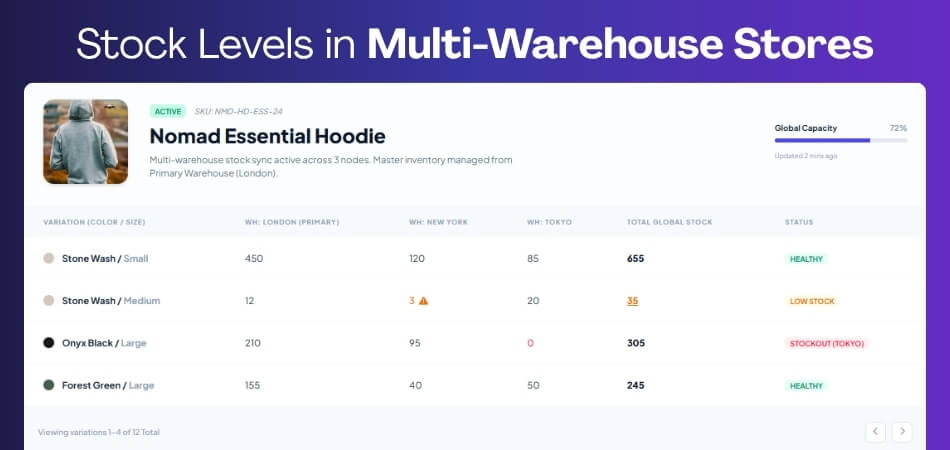
Why Variation Stock Issues Get Worse with Multiple Warehouses?
Managing variation stock across multiple warehouses increases complexity and makes WooCommerce variable product stock issues more difficult to control. Without a structured system, stock can easily go out of sync between locations, leading to inaccurate inventory and overselling. A structured multi-location inventory system ensures accurate variation stock tracking and prevents mismatch issues as your store grows.
Best Solution for Multi-Location Stores
To solve WooCommerce variations not reducing stock at scale, you need a system that tracks variation inventory separately for each location and keeps everything synchronized in real time.
Using a multi location inventory management for WooCommerce solution helps:
- Track variation stock per warehouse location
- Sync inventory in real time across all systems
- Prevent overselling across multiple locations
- Maintain accurate variation-level inventory
- Reduce WooCommerce variation stock not updating issues
Frequently Asked Questions About WooCommerce Variation Stock Issues
WooCommerce variation stock issues often create confusion around settings, order flow, and inventory behavior. These FAQs address the most common problems store owners face when variation stock is not updating correctly.
Why are WooCommerce variations not reducing stock?
This usually happens when variation-level stock management is disabled, stock is controlled at the parent level, or the order status does not trigger stock reduction. It is one of the most common WooCommerce variation stock not updating issues.
How do I fix WooCommerce variation stock not updating?
You can fix this by enabling stock management for each variation, setting stock quantities, ensuring the correct order status reduces stock, and checking for plugin or cache conflicts.
What causes WooCommerce variable product stock issues?
WooCommerce variable product stock issues are often caused by incorrect variation setup, missing stock values, parent-level stock control, or delayed inventory updates across the system.
Should I manage stock at the parent or variation level?
For accurate inventory tracking, stock should be managed at the variation level. Parent-level stock can cause incorrect quantities and lead to stock mismatch issues.
Why does variation stock not update after checkout?
This usually happens when the order status remains pending or when stock reduction is not configured to trigger at the correct stage, such as processing or completed.
Can plugins or themes affect WooCommerce stock updates?
Yes, third-party plugins or themes can interfere with WooCommerce inventory logic, override stock behavior, or delay updates, causing variation stock issues.
How do I prevent WooCommerce variation stock issues in the future?
Use variation-level stock management, keep inventory synced in real time, avoid manual overrides, and maintain a consistent inventory workflow across your store.
Does WooCommerce support variation stock by default?
Yes, WooCommerce supports variation-level stock, but it must be configured correctly. Without proper setup, variation stock may not update as expected.
Final Thoughts
WooCommerce variations not reducing stock is usually a result of misconfigured settings, incorrect stock control logic, or workflow gaps in how inventory is updated. While the issue may seem technical, it is often caused by simple mistakes in variation setup or order processing stages.
Fixing this problem starts with enabling proper variation-level stock management and ensuring that stock updates happen at the correct time during the order lifecycle. Once the workflow is aligned, WooCommerce variation stock not updating issues can be resolved quickly.
For stores managing multiple products, variations, or warehouse locations, maintaining consistent inventory control becomes more challenging. In such cases, using a multi location inventory management for WooCommerce solution helps ensure accurate stock tracking, real-time synchronization, and long-term inventory stability.