
WooCommerce variable product stock not working is a deeper inventory issue where the system fails to correctly track, update, or display stock for variations. Unlike simple stock reduction problems, this issue often affects the entire variation inventory logic, causing stock to appear incorrect, unavailable, or unchanged even after orders are placed.
In many cases, this happens due to a WooCommerce variable product stock issue where variation settings, stock validation, and order workflows are not properly aligned. As a result, WooCommerce stock not updating for variations becomes a recurring problem that can lead to overselling, incorrect availability, and poor customer experience.
In this guide, you will learn why WooCommerce variable product inventory problems happen, how to fix them step by step, and how to prevent variation stock issues from breaking your store’s inventory system.

What Does “WooCommerce Variable Product Stock Not Working” Mean?
When WooCommerce variable product stock is not working, it means the system is unable to correctly track, update, or display inventory for individual variations. This is not just a simple stock reduction issue. Instead, the entire variation-level inventory logic may fail, causing stock to remain unchanged, show incorrect values, or behave inconsistently across the store.
This WooCommerce variable product stock issue often appears when variation settings, stock validation rules, and order workflows are not properly aligned. In many cases, WooCommerce stock not updating for variations becomes a repeated problem, especially in stores with multiple variations or complex product configurations.
As a result, customers may see products as available when they are not, or variation selection may not reflect actual stock levels, leading to confusion and inaccurate inventory management.
Key Symptoms of WooCommerce Variable Product Inventory Problems
- Variation stock not updating after purchase or order completion
- Products showing incorrect or outdated availability
- Backend and frontend stock values not matching
- Variation selection not affecting stock or availability
- WooCommerce stock not updating for variations in real time
Quick Fix for WooCommerce Variable Product Stock Not Working
Before diving into detailed fixes, it’s best to try a few quick adjustments. Most WooCommerce variable product stock issues are caused by simple configuration errors that can be resolved within minutes. These quick fixes help restore correct inventory behavior and ensure WooCommerce stock not updating for variations is resolved quickly.
Quick Fix Checklist
- Enable stock management at the variation level instead of only at the parent product
- Assign accurate stock quantity for each variation
- Ensure the correct order status triggers stock updates (processing or completed)
- Disable conflicting plugins, scripts, or theme functions
- Clear cache to avoid outdated stock values on the frontend
- Avoid managing stock only at the parent product level
- Re-save product variations to refresh WooCommerce stock logic
Why WooCommerce Variable Product Stock Not Working Happens?
WooCommerce variable product stock not working is usually caused by system-level issues rather than a single incorrect setting. These problems occur when variation inventory logic, stock validation, and frontend display are not properly synchronized across the store.
In many cases, this WooCommerce variable product inventory problem develops over time as multiple settings, plugins, or workflows interact incorrectly. Understanding the root causes makes it much easier to fix WooCommerce stock not updating for variations effectively.
Stock Managed at the Wrong Level
When stock is controlled at the parent product level instead of the variation level, WooCommerce cannot track individual variation quantities correctly. This leads to inaccurate inventory updates and is one of the main reasons WooCommerce variable product stock issues occur.
Variation Stock Tracking Not Fully Enabled
If variation-level stock management is disabled or only partially configured, WooCommerce will not update variation inventory properly. This often results in WooCommerce stock not updating for variations after purchases.
Inconsistent Variation Quantities
When stock values are missing, uneven, or incorrectly assigned across variations, WooCommerce cannot maintain accurate inventory logic. Even small inconsistencies can cause variation stock to behave unpredictably.
Availability Logic Mismatch
Frontend product availability may not match actual variation stock due to incorrect display logic or theme customization. This creates confusion where products appear available even when they are out of stock.
Stock Validation Happens Too Late
If WooCommerce validates stock only after checkout or too late in the process, customers may be allowed to purchase unavailable variations. This breaks the inventory workflow and leads to overselling.
Cached Data Shows Outdated Stock
Caching layers or delayed AJAX updates can display old stock values on the frontend. This makes it seem like WooCommerce variable product stock is not working, even if backend data has been updated.
Order Flow Interrupts Stock Updates
Stock updates depend on proper order status and payment flow. If orders remain in pending status or payment confirmation is delayed, WooCommerce may not reduce or update variation stock correctly.
Plugin or Custom Code Conflicts
Third-party plugins, custom scripts, or theme functions can override WooCommerce’s default stock behavior. These conflicts often interrupt variation-level stock updates and create inconsistencies.
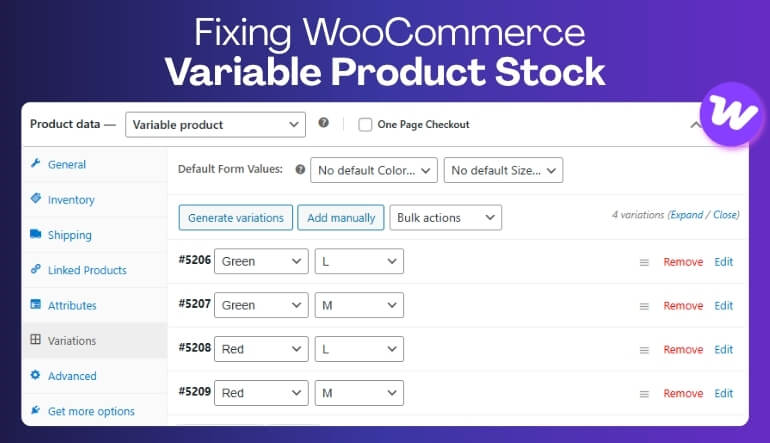
How to Fix WooCommerce Variable Product Stock Not Working?
Fixing WooCommerce variable product stock not working requires aligning variation-level inventory settings with WooCommerce order flow, stock validation, and frontend display logic. In most cases, the issue is not caused by a single error but by multiple small misconfigurations working together.
Follow these steps to fix WooCommerce stock not updating for variations and restore accurate inventory behavior across your store.
Fix 1: Move Stock Control to Variation Level
Each variation should manage its own inventory instead of relying on the parent product. When stock is controlled at the variation level, WooCommerce can correctly track and update quantities for each option.
Fix 2: Enable Complete Variation Stock Tracking
Make sure stock management is fully enabled for every variation. Partial or missing configuration is a common cause of WooCommerce variable product stock issues and prevents proper inventory updates.
Fix 3: Fix Variation Quantity Issues
Assign consistent and accurate stock values to all variations. Missing, blank, or uneven quantities can break inventory logic and lead to incorrect stock behavior.
Fix 4: Align Availability Logic with Real Stock
Ensure that frontend availability reflects actual variation inventory. If display logic relies on outdated or incorrect data, customers may see wrong stock status.
Fix 5: Validate Stock at the Right Stage
Stock validation should happen during add-to-cart or checkout. If validation occurs too late, WooCommerce may allow purchases for out-of-stock variations.
Fix 6: Prevent Cached Data Issues
Exclude variation stock data from cache layers. Cached product pages or AJAX responses can show outdated inventory, making it seem like stock is not working.
Fix 7: Fix Order and Payment Flow
Ensure that stock updates are triggered after the correct order status, usually processing or completed. Delayed or incorrect payment flow can interrupt stock updates.
Fix 8: Remove Plugin or Custom Code Conflicts
Test your store by disabling plugins or switching themes. Third-party tools or custom scripts can override WooCommerce stock logic and prevent variation updates.
Stock Not Updating vs Stock Not Working (Key Difference)
Many store owners confuse stock not reducing, stock not updating, and stock not working. However, these are different problems with different causes and solutions.
Understanding this difference is important when diagnosing a WooCommerce variable product stock issue correctly.
Key Comparison
| Issue | What It Means | Impact |
|---|---|---|
| Stock Not Reducing | Quantity is not decreasing after purchase | Partial issue |
| Stock Not Updating | Stock changes are delayed or not reflected correctly | Sync issue |
| Stock Not Working | Entire variation inventory system is not tracking properly | System-level issue |
WooCommerce Settings That Affect Variable Product Stock
WooCommerce variable product stock not working is often linked to incorrect default settings. Even if variations are configured correctly, global WooCommerce settings can override or interrupt stock updates. Reviewing these settings ensures that WooCommerce stock not updating for variations is not caused by system configuration issues.
Important Settings to Check
- Enable Stock Management: This must be turned on globally for WooCommerce to track inventory properly.
- Set Correct Hold Stock Duration: If stock is held too long or too short, it can create temporary inconsistencies in variation availability.
- Disable Unnecessary Backorders: Backorders allow purchases without stock, which can hide real WooCommerce variable product stock issues.
- Ensure Proper Stock Reduction Stage: Stock should be reduced when orders reach processing or completed status.
- Enable Low Stock Alerts: Notifications help detect stock issues early before they impact sales.
When WooCommerce Variable Product Stock Issues Appear?
WooCommerce variable product stock not working does not always appear immediately. In many cases, the issue becomes visible only during specific stages of the purchase or inventory update process. Identifying when the issue happens helps isolate the root cause and fix WooCommerce stock not updating for variations more efficiently.
Common Scenarios
- After Checkout: Orders are placed, but variation stock is not updated correctly.
- During Payment Processing: Stock updates may fail if payment confirmation or order status is delayed.
- When Switching Variations: Incorrect variation selection logic may prevent accurate stock tracking.
- During High Traffic: Multiple simultaneous orders can create delays in stock updates.
- When Using Cache or AJAX: Cached data or delayed responses can show outdated stock values.
How to Prevent WooCommerce Variable Product Stock Issues?
Preventing WooCommerce variable product stock not working issues requires maintaining a consistent inventory workflow across variation settings, stock validation, and order processing. Once your system is properly configured, most WooCommerce variable product inventory problems can be avoided before they impact your store.
The key is to ensure that stock tracking, updates, and display logic all follow the same structured process.
Best Practices to Prevent Stock Issues
-
- Always Use Variation-Level Stock Tracking: Each variation should have its own stock quantity to ensure accurate inventory updates and avoid shared stock confusion.
- Keep Inventory Synchronized in Real Time: Ensure stock updates are reflected instantly across frontend, backend, and checkout to prevent WooCommerce stock not updating for variations.
- Avoid Manual Overrides: Frequent manual edits can break structured inventory logic and create inconsistencies across variations.
- Test Variation Workflows Regularly: Check how variations behave during add-to-cart, checkout, and payment to ensure stock updates correctly.
- Use a Structured Inventory Workflow: Maintain consistent rules for stock deduction, validation, and display across your entire store.
Why Multi-Location Inventory Makes Variable Product Stock Issues Worse?
WooCommerce variable product stock not working becomes more complex when managing multiple warehouses or store locations. Each variation must maintain accurate stock levels across different locations, which increases the chances of mismatch if inventory is not properly synchronized. Without a structured system, WooCommerce variable product stock issues can lead to incorrect stock availability, overselling, and inconsistent inventory across locations.
Best Solution for Multi-Location Stores
To fix WooCommerce stock not updating for variations at scale, you need a system that tracks variation inventory separately for each location and ensures real-time synchronization.
Using a multi location inventory management for WooCommerce solution helps:
- Track variation stock per warehouse or store location
- Sync inventory in real time across all systems
- Prevent overselling across multiple locations
- Maintain accurate variation-level inventory
- Reduce WooCommerce variable product inventory problems

Frequently Asked Questions
WooCommerce variable product stock not working issues often create follow-up questions beyond basic setup and fixes. The questions below focus on real-world scenarios where WooCommerce stock not updating for variations behaves inconsistently across different conditions.
Why do WooCommerce variable product stock issues affect some variations but not others?
Each variation in WooCommerce is treated as a separate inventory unit, which means small differences in stock configuration, attributes, or order flow can affect them differently. This is a common WooCommerce variable product stock issue where one variation works correctly while another fails due to incomplete or inconsistent setup.
Can WooCommerce variable product stock not working happen even when simple product stock works fine?
Yes, variable products rely on more complex logic compared to simple products. WooCommerce must track selected variation data, validate stock, and update inventory correctly. Because of this, WooCommerce stock not updating for variations can occur even when simple product stock behaves normally.
Why does WooCommerce variation stock look correct during testing but break later?
In many cases, initial testing does not reveal issues caused by caching, plugin conflicts, or delayed order processing. As real traffic increases, WooCommerce variable product inventory problems may appear due to timing issues, repeated orders, or system-level conflicts.
Does a larger catalog increase WooCommerce variable product stock issues?
Yes, larger catalogs with multiple attributes, variations, and product combinations increase the complexity of inventory management. As complexity grows, WooCommerce variable product stock not working becomes more likely if inventory workflows are not structured properly.
When does a WooCommerce store need more than default stock settings?
A store typically needs more advanced inventory control when default WooCommerce settings cannot handle variation-level complexity. This happens when managing multiple variations, high order volume, or multi-location inventory, where stock synchronization becomes critical.
Why does WooCommerce stock not update for variations during high traffic?
During high traffic, multiple users may try to purchase the same variation at the same time. Without proper stock validation timing or real-time synchronization, WooCommerce may delay updates, causing variation stock to appear incorrect or not update properly.
Can caching cause WooCommerce variable product stock not working issues?
Yes, caching can display outdated stock values on product pages or during variation selection. Even if backend inventory is updated, the frontend may still show old data, making it look like WooCommerce stock not updating for variations.
How can I avoid WooCommerce variable product inventory problems long-term?
To avoid WooCommerce variable product inventory problems, you need consistent variation-level stock tracking, real-time inventory updates, and a structured workflow. Avoid manual overrides and ensure all stock-related processes follow the same logic across your store.
Final Thoughts
WooCommerce variable product stock not working is rarely a single-setting problem. It usually indicates deeper issues in how variation inventory is configured, updated, and synchronized across your store. When stock tracking fails at the variation level, it can quickly lead to incorrect availability, overselling, and unreliable inventory data.
Fixing this issue requires aligning variation-level stock management with WooCommerce order flow and ensuring that inventory updates happen consistently at the correct stage. Once your workflow is properly structured, WooCommerce stock not updating for variations can be resolved effectively.
For stores managing large catalogs or multiple locations, maintaining accurate variation inventory becomes more complex over time. In these cases, using a multi location inventory management for WooCommerce solution helps ensure real-time synchronization, better control, and long-term inventory accuracy across all variations.