
WooCommerce allows orders when out of stock in situations where inventory rules, backorder settings, or stock availability logic are not properly controlled. While this behavior can be intentional in some stores, it often leads to a WooCommerce overselling issue where customers are able to purchase products that are no longer available.
In many cases, WooCommerce selling out of stock products happens because backorders are enabled without clear limits, stock status is delayed, or product availability is not synced correctly across the store. As a result, WooCommerce may continue accepting orders even after stock reaches zero, creating confusion, fulfillment delays, and inaccurate inventory tracking.
Understanding why WooCommerce allows orders when out of stock is important, especially for stores managing multiple products, variations, or locations. In this guide, you will learn the real causes behind this behavior, how to control backorders properly, how to stop unwanted overselling, and how to maintain accurate stock availability without blocking legitimate sales.
What Does “WooCommerce Allows Orders When Out of Stock” Mean?
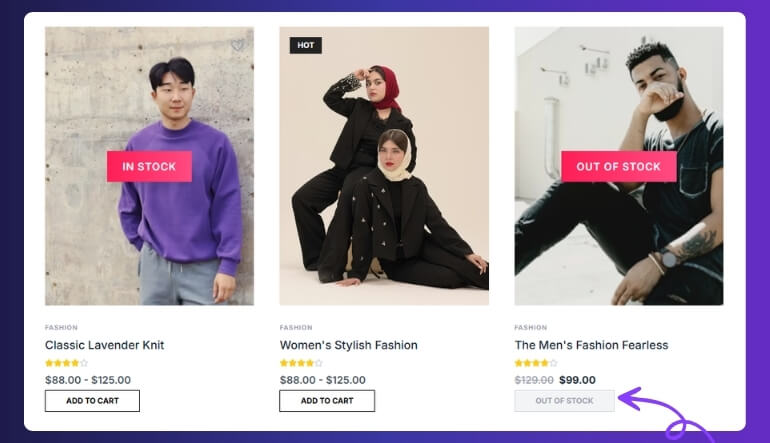
When WooCommerce allows orders when out of stock, it means customers can still purchase a product even though its inventory has already reached zero or is no longer available. Instead of blocking the purchase, the store continues to accept orders based on its stock configuration, often leading to a WooCommerce overselling issue if not properly controlled.
This situation typically happens when backorders are enabled, stock availability is not updated in real time, or the system does not correctly reflect actual inventory levels. As a result, WooCommerce selling out of stock products becomes possible, even when the store owner expects orders to stop automatically.
Key Understanding
- Out of stock but still purchasable: Products show zero or unavailable stock, but customers can still place orders due to backorder settings or delayed stock validation.
- Availability mismatch: The frontend display, cart behavior, or checkout logic does not match the actual inventory, allowing purchases beyond available stock.
Why It Matters
If this behavior is not managed properly, it can lead to overselling, order delays, customer dissatisfaction, and inventory confusion. However, when controlled correctly, it can also be used strategically to accept backorders without losing sales.
Why WooCommerce Allows Orders When Out of Stock
WooCommerce allows orders when out of stock mainly due to how inventory rules, backorder settings, and stock validation logic are configured. In many cases, this behavior is not a system error but a result of settings that intentionally or unintentionally allow purchases beyond available stock.
When these controls are not properly managed, it leads to a WooCommerce overselling issue where customers can place orders even though the product is no longer available. Understanding these causes helps you control WooCommerce selling out of stock products without completely blocking legitimate backorders.
Backorders Enabled Without Proper Control
Backorders allow customers to purchase products even when stock is zero. If enabled without limits or clear messaging, WooCommerce will continue accepting orders, leading to overselling.
Stock Status Not Updating in Real Time
Sometimes stock reaches zero in the backend, but the frontend still shows the product as available. This delay creates an availability mismatch and allows orders to go through.
Caching or Delayed Inventory Display
Caching systems can store outdated stock data. Even if inventory is updated, customers may still see old availability and place orders, causing WooCommerce selling out of stock products.
Variation-Level Stock Mismatch
For variable products, stock may be managed incorrectly across variations. One variation may be out of stock, but others still allow selection, creating confusion and incorrect order acceptance.
Weak Stock Validation During Checkout
If WooCommerce does not validate stock properly during add-to-cart or checkout, customers may complete orders even when inventory is already depleted.
Multi-Location Inventory Conflicts
When managing multiple warehouses or stores, stock may not sync correctly across locations. One location may be out of stock, while another still shows availability, leading to incorrect order processing.
Plugin or Custom Code Overrides
Some plugins or custom scripts override default WooCommerce behavior and allow purchases even when stock is unavailable. This can break standard stock control logic.
Delayed Sync Between Systems
If your store uses external tools like ERP, POS, or inventory sync systems, delays in synchronization can cause WooCommerce to accept orders based on outdated stock data.
When WooCommerce Allows Orders Even When Products Are Out of Stock?
WooCommerce allows orders when out of stock in specific situations where stock validation, availability updates, or system timing do not align correctly. These scenarios often lead to WooCommerce selling out of stock products without the store owner realizing it immediately.
Understanding when this happens helps you detect and control WooCommerce overselling issues before they impact customers and order fulfillment.
When Stock Reaches Zero During Active Orders
If multiple customers are purchasing the same product at the same time, WooCommerce may process orders before the stock is fully updated. This delay can allow extra orders even after inventory reaches zero.
During High Traffic or Flash Sales
In high-traffic situations, stock updates may not sync instantly across all sessions. This creates a gap where customers can still place orders, causing WooCommerce overselling issues.
When Backorders Are Enabled
When backorders are turned on, WooCommerce intentionally allows orders beyond available stock. Without proper limits or messaging, this can appear as a stock control problem.
When Cached Pages Show Old Stock
Caching systems can display outdated product availability. Even if stock is updated in the backend, customers may still see the product as available and complete the purchase.
When Switching Between Product Variations
In variable products, selecting different variations may not always trigger real-time stock validation. This can allow orders for out-of-stock variations.
When Inventory Sync Is Delayed
Stores using external systems like ERP, POS, or multi-location inventory may experience delays in syncing stock. During this delay, WooCommerce may accept orders based on outdated inventory data.
When Checkout Validation Is Weak
If stock validation is not enforced strictly at checkout, WooCommerce may allow customers to complete orders even when the product is already out of stock.
Quick Fix to Stop WooCommerce Allowing Orders When Out of Stock
If WooCommerce allows orders when out of stock, use this quick checklist to identify and fix the issue fast. These are the most common causes of WooCommerce overselling issues.
Quick Checkpoints
- Backorders enabled → Disable or limit where not needed
- Stock status incorrect → Ensure it switches to “Out of Stock” at zero
- No stock validation at checkout → Enable proper validation
- Cached product pages → Clear cache and refresh stock display
- Variation stock mismatch → Check each variation’s availability
- Delayed stock sync → Review real-time inventory updates
- Plugin conflict → Disable and test third-party tools
Quick Action Tip
👉 If you need full control, move to the detailed fix section below and configure stock validation, backorders, and availability rules properly.
How to Stop WooCommerce from Selling Out of Stock Products
Fixing WooCommerce allows orders when out of stock requires controlling how stock is validated, displayed, and processed during the purchase flow. Instead of completely disabling features like backorders, the goal is to ensure that WooCommerce only allows orders under the right conditions.
Follow these steps to fix WooCommerce overselling issues and prevent unwanted purchases when products are out of stock.
Fix 1: Configure Backorders Properly (Controlled Approach)
Backorders are not the problem — uncontrolled backorders are. You should allow them only where necessary and with proper visibility.
Check for issues such as:
- Backorders enabled for all products without restrictions
- No clear message shown to customers about backorder status
- No control over which products should allow backorders
Fix 2: Enforce Real-Time Stock Validation
WooCommerce must validate stock before allowing add-to-cart and checkout actions.
Check for issues such as:
- Stock validation not triggered at checkout
- Customers able to bypass stock limits
- Delayed stock checks during order processing
Fix 3: Sync Stock Status with Quantity
Stock status should always reflect actual inventory. If not, WooCommerce may continue accepting orders.
Check for issues such as:
- Product marked as In Stock even when quantity is zero
- Stock status not updating after sales
- Manual overrides causing mismatch
Fix 4: Fix Variation-Level Availability Logic
For variable products, each variation must follow correct stock rules.
Check for issues such as:
- Variations allowing selection when out of stock
- Parent product overriding variation availability
- Inconsistent stock tracking across variations
Fix 5: Optimize Checkout Stock Control
Checkout is the final point where WooCommerce should block invalid orders.
Check for issues such as:
- Checkout not re-validating stock before order placement
- Multiple customers purchasing last available item
- No restriction during high-traffic purchases
Fix 6: Control Inventory Across Multiple Locations
If you manage multiple warehouses, stock must be validated per location.
Check for issues such as:
- Orders processed from wrong location stock
- Inventory mismatch between locations
- No location-based stock control
Fix 7: Remove Conflicts from Plugins or Custom Code
External tools may override WooCommerce stock behavior.
Check for issues such as:
- Plugins allowing purchases regardless of stock
- Custom code bypassing stock validation
- Conflicting inventory or checkout plugins
Fix 8: Monitor and Test Real Purchase Flow
Always test your store under real conditions to confirm stock behavior.
Check for issues such as:
- Orders going through after stock reaches zero
- Variation and product behavior mismatch
- Inconsistent results across different devices or sessions
Backorders vs Out of Stock in WooCommerce (Important Difference)
Many store owners confuse backorders with out-of-stock behavior, but they serve completely different purposes. Understanding this difference is essential to control WooCommerce allows orders when out of stock without causing unwanted overselling.
Key Comparison
| Setting | Behavior | Impact on Orders |
|---|---|---|
| Backorders Enabled | Customers can place orders even when stock is zero | Orders are allowed intentionally |
| Out of Stock (Backorders Disabled) | Purchase is blocked when stock reaches zero | Orders are restricted |
| Backorders with Notification | Orders allowed with customer warning | Controlled overselling |
| Strict Stock Control | Orders blocked at zero stock | No overselling |
What This Means
- Backorders are not a problem by default: They are a built-in WooCommerce feature designed to allow continued sales when inventory is temporarily unavailable.
- Overselling happens when backorders are not controlled: If backorders are enabled without limits, messaging, or proper inventory tracking, WooCommerce selling out of stock products becomes a serious issue.
Best Practice (Recommended Approach)
Instead of disabling backorders completely:
- Allow backorders only for selected products
- Show clear “Available on backorder” messages
- Limit quantity or availability where needed
- Combine backorders with proper stock validation
Key Insight
👉 The goal is not to stop WooCommerce from allowing orders when out of stock, but to control when and how it happens.
WooCommerce Settings That Control Out-of-Stock Orders
WooCommerce allows orders when out of stock mainly because of how stock settings and backorder rules are configured. If these settings are not properly adjusted, your store may continue accepting orders even when products are unavailable.
Reviewing and optimizing these settings is essential to control WooCommerce selling out of stock products and prevent unwanted overselling issues.
Key Settings to Check
- Manage Stock (Global Setting): Make sure stock management is enabled so WooCommerce can track inventory and apply stock rules correctly.
- Stock Status Behavior: Ensure products automatically switch to Out of Stock when quantity reaches zero.
- Backorder Configuration
Set backorders carefully: - Allow only for selected products
- Enable customer notification
- Avoid enabling globally without control
- Out-of-Stock Visibility: Decide whether out-of-stock products should be hidden or visible. Keeping them visible with proper messaging is often better for user experience.
- Low Stock & Out-of-Stock Notifications: Enable alerts so you can react before WooCommerce overselling issues occur.
How to Prevent WooCommerce from Selling Out of Stock Products
Preventing WooCommerce allows orders when out of stock requires a structured approach to inventory control, availability logic, and system consistency. Once properly configured, you can avoid WooCommerce overselling issues without losing the flexibility of controlled backorders.
Best Practices for Prevention
- Use Controlled Backorders Only: Allow backorders only where necessary and always show clear stock messages to customers.
- Maintain Real-Time Inventory Sync: Ensure stock updates are reflected instantly across product pages, cart, and checkout.
- Avoid Manual Stock Overrides: Frequent manual edits can break inventory logic and cause availability mismatch.
- Test Product Behavior Regularly: Check how products behave when stock reaches zero to confirm orders are blocked or controlled correctly.
- Monitor High-Demand Products Closely: Products with high traffic or frequent sales are more likely to face WooCommerce selling out of stock products issues.
- Use Structured Inventory Management: Implement consistent rules for stock validation, availability display, and order processing.
Why Multi-Location Inventory Makes WooCommerce Overselling Worse
WooCommerce allows orders when out of stock more frequently in stores that manage inventory across multiple warehouses or locations. When stock is distributed, the system must track availability separately and synchronize it in real time. If this process is not controlled properly, WooCommerce selling out of stock products becomes a common issue.
In multi-location setups, one location may be out of stock while another still shows availability. Without proper validation, WooCommerce may accept orders based on incorrect or outdated stock data, leading to overselling and fulfillment confusion.
Best Solution for Multi-Location Stores
To prevent WooCommerce overselling issues in a multi-location environment, you need a system that controls stock visibility, validation, and order processing per location.
Using a multi location inventory management for WooCommerce solution helps:
- Track stock separately for each warehouse or store
- Control backorders based on location availability
- Sync inventory in real time across all locations
- Prevent WooCommerce selling out of stock products
- Ensure accurate order routing and stock deduction
Frequently Asked Questions About WooCommerce Allowing Orders When Out of Stock
WooCommerce overselling issues often create confusion about stock rules, backorders, and product availability. These FAQs focus on real-world scenarios where WooCommerce allows orders when out of stock.
Why does WooCommerce allow orders when out of stock?
WooCommerce allows orders when out of stock mainly due to backorder settings, delayed stock updates, or availability mismatch. In many cases, the system is configured to accept orders intentionally, but without proper control, it turns into a WooCommerce overselling issue.
Is WooCommerce selling out of stock products a bug?
No, it is usually not a bug. WooCommerce selling out of stock products happens because of configuration settings like backorders or delayed stock validation. The issue arises when these features are not properly managed.
How do I stop WooCommerce from allowing out-of-stock orders?
You can stop WooCommerce from allowing out-of-stock orders by disabling or limiting backorders, enforcing stock validation at checkout, and ensuring stock status updates correctly when inventory reaches zero.
Can I allow backorders without overselling?
Yes, you can allow backorders in a controlled way by limiting products, showing clear customer messages, and combining them with accurate stock tracking. Controlled backorders help avoid WooCommerce overselling issues.
Why does WooCommerce overselling happen during high traffic?
During high traffic, stock updates may not sync instantly across all sessions. This delay can allow multiple customers to purchase the same product, leading to WooCommerce selling out of stock products.
Do plugins affect WooCommerce stock availability?
Yes, plugins and custom code can override stock validation rules and allow purchases even when stock is unavailable. This is a common cause of WooCommerce allows orders when out of stock issues.
How do I manage stock across multiple locations?
To manage stock across multiple locations, you need a system that tracks inventory per location and synchronizes it in real time. Without this, WooCommerce overselling issues become more frequent.
How can I prevent WooCommerce overselling long-term?
You can prevent WooCommerce overselling by using controlled backorders, real-time inventory sync, proper stock validation, and consistent inventory management rules across your store.
Final Thoughts
WooCommerce allows orders when out of stock is not always a mistake. In many cases, it is a result of how backorders, stock validation, and availability rules are configured. The real problem begins when these features are not controlled properly, leading to WooCommerce overselling issues and inaccurate inventory tracking.
Fixing this issue requires more than just disabling backorders. It requires a structured approach where stock validation, product availability, and order processing work together consistently. When these elements are aligned, WooCommerce can allow orders only when appropriate, without creating confusion or fulfillment problems.
For stores managing large catalogs, variations, or multiple locations, maintaining this level of control becomes more complex. In such cases, using a multi location inventory management for WooCommerce solution helps ensure accurate stock visibility, controlled backorders, and real-time synchronization across all products and locations.